GIF generation is still evolving, and it can’t do everything you imagine yet. But when you work within its strengths, clean images, clean movements, and coherent prompts, it delivers impressive, polished results that feel alive without breaking the integrity of the original photo.
This guide will teach you how to transform any still image into an AI-generated GIF in just a few clicks. Once you know how prompts shape the motion, bringing images to life is simple.
Current Limitations
GIF generation is still under active development. It can animate subtle and image-consistent movements extremely well, but it cannot perform complex transformations, redraw entire poses, or create animations that contradict the original photo.
Start With a Strong First Image
Your GIF will never be better than your starting image. It animates exactly what you give it, flaws included. If the base image is blurry, over-edited, poorly lit, or full of visual noise, the outcome won’t be desirable.
A clean, high-quality input is the single biggest factor in whether your GIF turns out smooth and natural or warped and unusable.
Choose an image with:
- A clean subject - no messy edges, no cropped limbs, no awkward body cuts
- Clear, consistent lighting - avoid harsh shadows, blown-out highlights, or mixed light sources
- Minimal clutter - busy backgrounds introduce jitter and frame instability
- Zero distortions - no warped limbs, no stretched faces, no artifacts
- A strong pose or readable facial angle - the model needs a clear structure to animate naturally
When the base image is sharp, stable, and visually coherent, the animation will follow the same quality.
Motion Must Fit the Image
GIF generation can handle small, medium, and even moderately large movements as long as the animation logically fits the original image, pose, lighting, and anatomy. While there are some cases where the context of the image can be changed, we highly recommend animating an image in based on the context of the source image.
If the motion prompt matches the source, you’re safe.
If the motion contradicts the source, you may get distortion.
Great motions that can match an image:
- A character already looking sideways → subtle head turn
- Hair naturally loose → believable breeze motion
- Clothing with folds → light fabric sway
- Ambient scenes → flickering light, smoke, glow, shadows moving
- Slight facial/emotional changes → micro-expressions
Motions that may break the image:
- Extreme head snaps from a fixed pose
- Full body repositioning
- Movements requiring new angles, new limbs, or unseen areas
- Actions the anatomy of the image cannot support
- Any motion that requires redrawing the entire character
Apply Multiple Motions If They Fit the Duration & the Image
You’re not limited to “one or two” motions.
You can include several motions as long as:
- They fit within the GIF duration naturally,
- They match the anatomy, lighting, and pose of the starting image,
- They don’t contradict each other.
Key Reminder: More motions are fine as long as they all logically fit the pose and fit smoothly into the chosen duration (3s, 5s, 10s, etc.).If your motions exceed the duration, they’ll clip, jitter, or may break.
GIF Prompt Structure
You can use this structure for ALL GIF creation:
[MAIN ACTION] + [MOTION LAYERS] + [IMAGE/STYLE MATCH]
Where:
MAIN ACTION = Describe what the GIF is fundamentally doing.
MOTION LAYERS = Additional but necessary prompts that improve motion.
IMAGE/STYLE MATCH = “Match original lighting, anatomy, and angle.” Feel free to try to change face, body, outfit, or colors. - (It may not or may work) (Optional)
POV Missionary
Prompt Used
deep thrusting in POV missionary, fluid motion, sex, deep full-length thrusting, cock sliding completely in and out, hip thrusts, thrusting hips, sliding cock in and out, fucking, hips slamming, breasts bouncing hard, pussy clenching and squirting, seamless loop,
[MAIN ACTION] deep thrusting in POV missionary
[MOTION LAYERS] fluid motion, sex, deep full-length thrusting, cock sliding completely in and out, hip thrusts, thrusting hips, sliding cock in and out, fucking, hips slamming, breasts bouncing hard, pussy clenching and squirting
More Examples
3rd Person Cowgirl
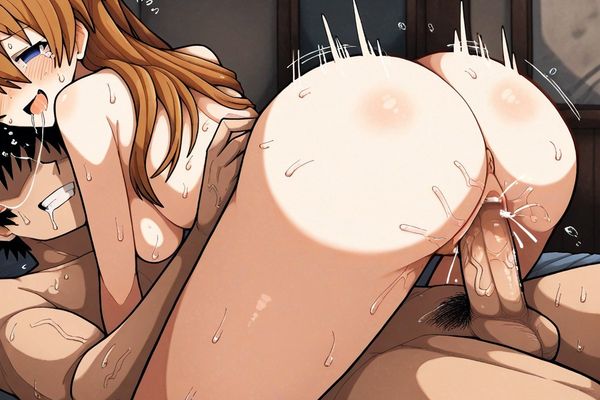
Prompt used
3rd person cowgirl, intense cowgirl fucking animation, the woman is moving her hips up and down fast and consistent, consistently and fast movement, the penis slides easily in and out of the woman's vagina, the penis slides completely in and out of the woman's vagina, her breasts are bouncing,
[MAIN ACTION] 3rd person cowgirl
[MOTION LAYERS] intense cowgirl fucking animation, the woman is moving her hips up and down fast and consistent, consistently and fast movement, the penis slides easily in and out of the woman's vagina, the penis slides completely in and out of the woman's vagina, her breasts are bouncing
Quick Tips for Better Results
Be specific but simple – “smiles warmly” works better than “shows emotion.”
Limit movements – Too many prompts for animations can feel chaotic.
Think in layers – First the subject, then subtle environmental motion.
Refine iteratively – Small prompt tweaks often give the best results.
Master the fundamentals, stay within the image’s limits, and you’ll consistently produce high-quality, natural GIFs that loop beautifully. Treat it like a precise tool and it will outperform your expectations every time.